Orders from the chat
Create an order straight from the conversation — the title, date, size, tiers and quoted price are already filled in from what was discussed.
For custom-order bakers
Bakersline reads the messages your customers send on Instagram and WhatsApp, writes the reply in your words, using your prices — and waits. You read it, you tap send. It never messages a customer on its own.
Built with a working bakery, not in a boardroom. No card to sign up.
Watch it work
A Tuesday morning message becomes a confirmed three-tier cake with an advance paid. Every step is the real interface. Pick any chapter.
How it works
The order matters. Nothing reaches a customer until you have read it and tapped send — not on your busiest Saturday, not at two in the morning, not ever.
Instagram DMs and WhatsApp land in one inbox, with the whole conversation in one place — no switching apps, no scrolling to find what they asked last week.
In your words, from your prices, your lead times and your rules. It shows its working on a quote, and it will tell a customer their reference image is AI-generated and can't be made.
Read it, edit a line if you want, tap send. Every reply records who approved it, so a team of two always knows who said what.
See it
Not a mock-up and not a concept. These are real screens with a bakery's own numbers in them — the queue you check on a Tuesday morning, and the three screens most bakers have never had at all.
One card per person, never two — approving twice and sending a customer two contradicting replies is a mistake the software will not let you make.
Each card shows what they asked, what Bakersline wrote back, and how long is left to reply. When it has spotted a real order forming, it says so, with the date and the size it read out of the conversation.
Notice the second card. Bakersline said no — the date was inside her lead time and the diary was full — and offered the first date she could actually do.
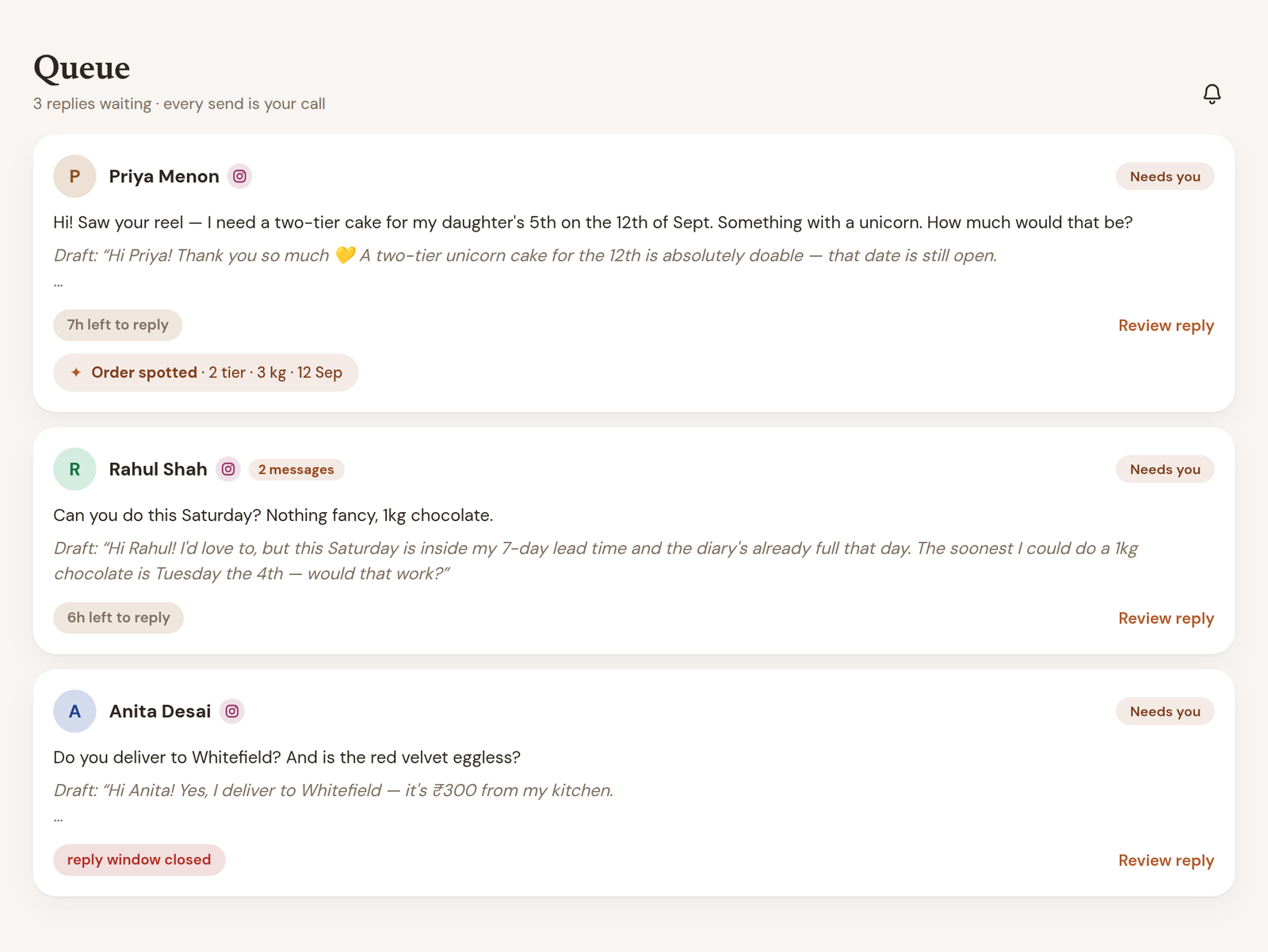
Queue · three enquiries, three drafts, none of them sent
Not a dashboard for its own sake. Booked is the work you agreed; collected is money that actually arrived. A month can be excellent at one and frightening at the other, and showing only one of them is how a small business gets surprised.
Underneath: what you kept after what you spent, who your best clients really are, and which orders still owe you money — worst first.
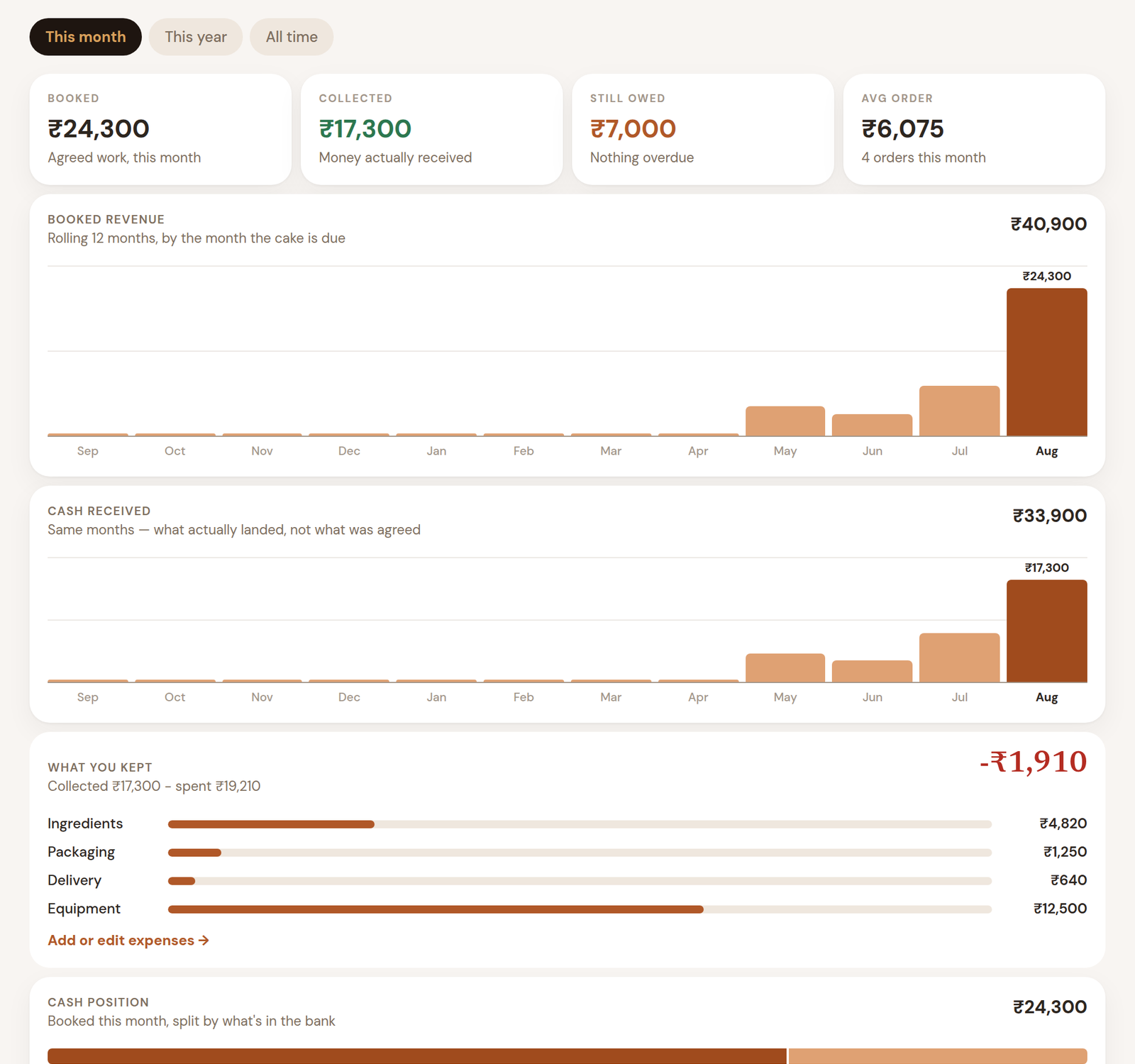
Reports · booked vs collected, and what you actually kept
Enter what a pack of butter costs and how big the pack is, once. Write your recipes in the quantities you already use. Bakersline works out the cost per batch and per kilo, and tells you your real margin against the rate you charge.
Costs are never stored — they are recalculated every time you look. Put up the price of flour and every recipe that uses it moves the same afternoon, which is exactly what a saved figure would fail to do.
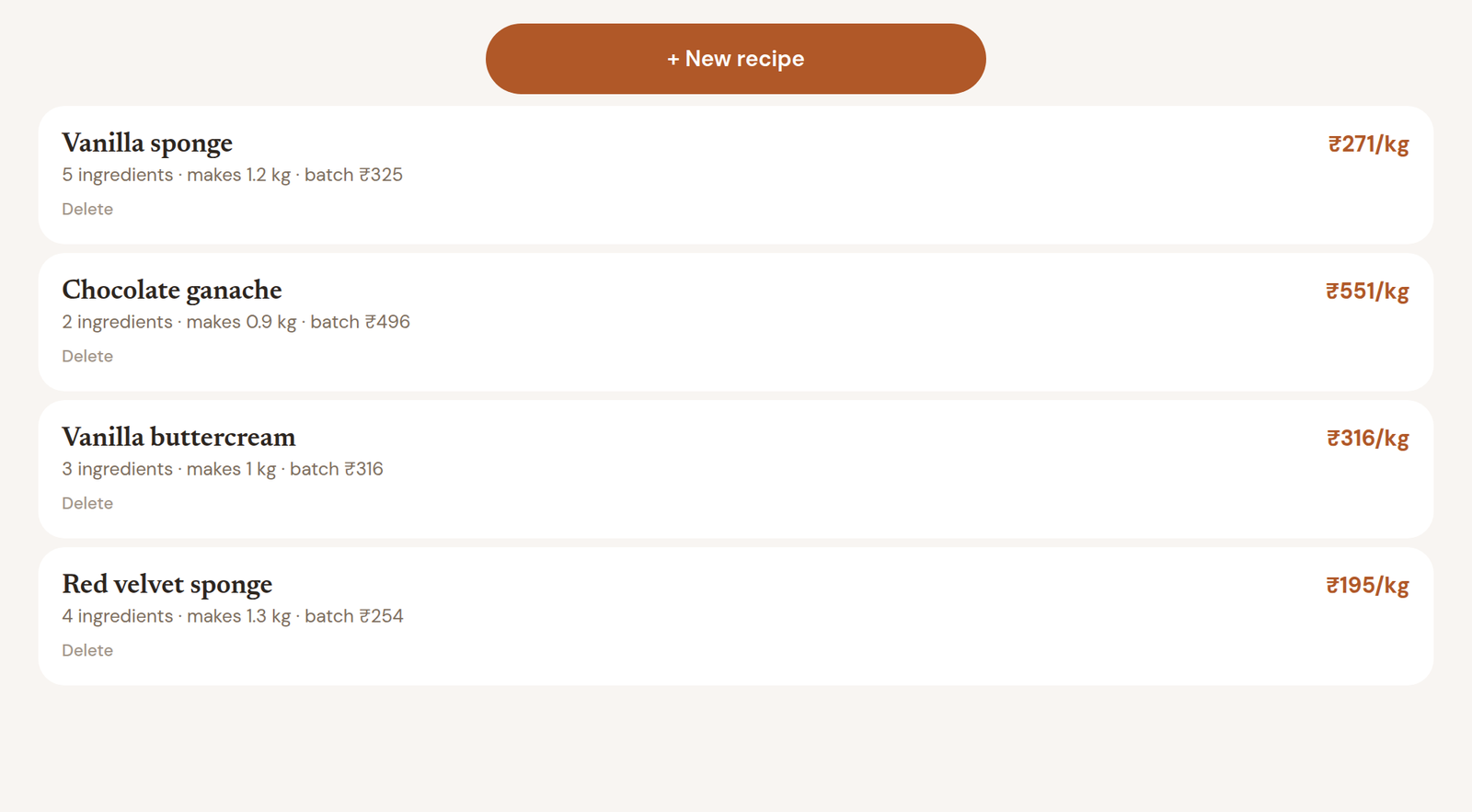
Recipes & costs · cost per kg, recalculated live
Four fields, on purpose: amount, category, a note, and the day. A baker will not keep a ledger that asks for VAT codes, and a half-kept ledger is worse than none — it produces a margin people believe.
That's all Reports needs to stop telling you what you earned and start telling you what you kept.
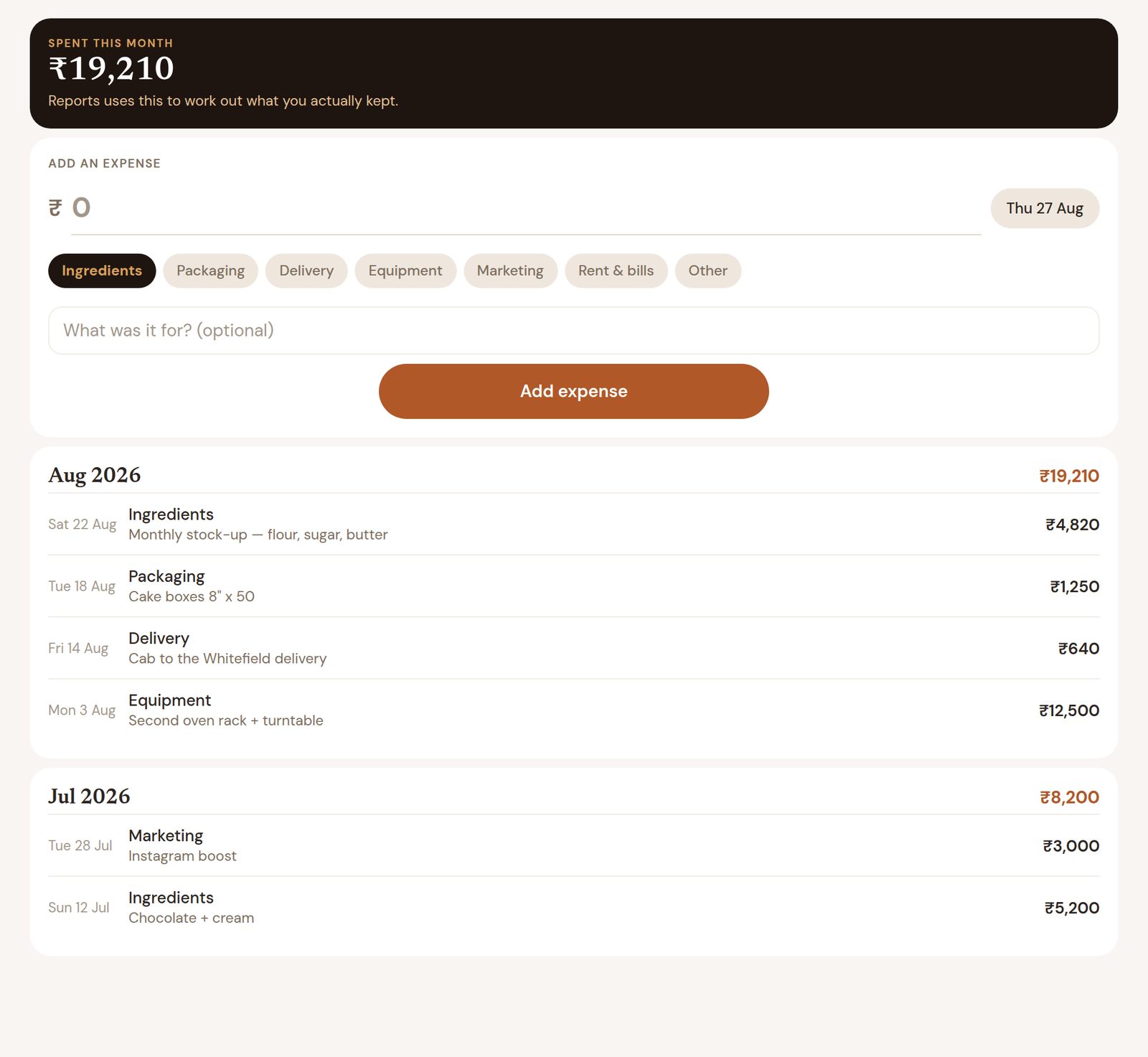
Expenses · four fields, then the P&L works
What it's worth
Four things change on the day you start, and only one of them is about typing less.
Instagram closes the door on a conversation after 24 hours. Every enquiry that arrives while you're piping at midnight and gets answered on Thursday is a cake someone else made. A draft that's ready when you wake up is the whole difference.
Most bakers under-quote when they're tired and over-quote when they're busy. Bakersline quotes from the rate and the rules you set once, and shows its working so you can see how it got there before anyone else does.
It will not offer a date that's full or inside your lead time. The reply says no, politely, and offers the first day you could genuinely do — which keeps the customer instead of losing them to a promise you'd have to break.
| Enquiries a week | 30 |
| Minutes you spend reading and replying to each | 6 min |
| Time on the inbox, per week | 3 hours |
| Reading and approving a ready draft instead | about 1 min |
| Hours a week you get back | 2 hr 30 |
| Over a year | about 130 hours |
Substitute your own two numbers — enquiries a week, and minutes per reply — and the rest follows. We've deliberately not put a money figure on the hours: what an hour in your kitchen is worth is yours to decide, and any number we invented would be flattering rather than true. The larger gain is usually the enquiry you never got to at all.
Getting set up
You sign in on Instagram's and Meta's own pages — Bakersline never sees a password, and you can disconnect either account at any time. Here's the whole path, end to end.
Your name, your bakery's name, a brand colour. That's the whole sign-up.
Your account needs to be a professional one — Business or Creator — and tools need permission to reach your messages. Then it's one button in Bakersline and a sign-in on Instagram's page.
What you grant: read the messages people send your business account · send replies you have approved · see your business profile. No posting, no follower lists, no access to your personal account.
Two ways, and the right one depends on whether you want to keep answering from your phone. Coexistence lets your existing WhatsApp Business number run in the app and in Bakersline at once — replies you send from your handset show up here too. Or use a separate number that lives only in Bakersline.
What you grant: receive the messages customers send this number · send replies you have approved. Your personal WhatsApp is never touched.
This is the part most tools get wrong. Instead of a blank form asking you to describe your own pricing and — impossibly — the way you write, Bakersline reads the conversations you've already had, works it out, and shows you the messages behind every number. You confirm rather than type. Or fill it in yourself; that's a button too.
The next customer who messages you appears in the Inbox with a draft waiting in the Queue. Read it, change a word if you want, tap send. Nothing went anywhere until you did.
Exact menus, what each permission means, and the four things that usually go wrong — written for a baker, not a developer.
Connecting your accounts
You sign in on Meta's own pages — never ours. Bakersline is handed a permission slip it can't use to post, follow, or read your personal account, and you can tear it up from your own Instagram settings without asking us.
About 10 minutes
About 15 minutes — most of it Meta verifying you
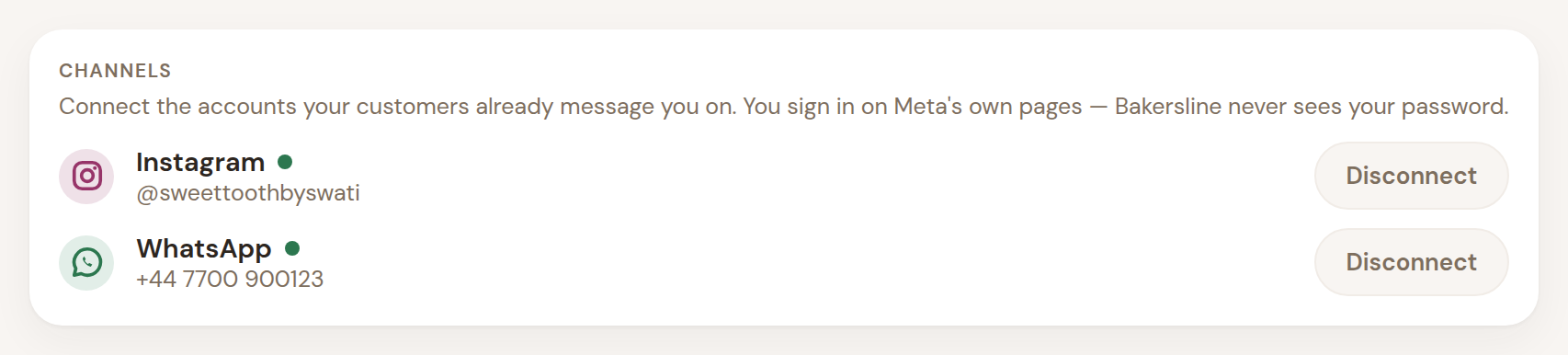
What connected looks like. One tap on Disconnect and messages stop arriving — your orders, customers and history stay exactly where they are.
Setup
Most tools hand you a blank form and ask you to describe your own pricing, your lead times, and — impossibly — the way you write. Bakersline reads your past conversations instead, works it out, and shows you the messages behind every number so you can check it in a minute rather than type for twenty.
Prefer to fill it in yourself? That's a button too.
Beyond the inbox
A reply is only the start. The enquiry that turns into a cake has a date, a size, a balance owing and a person behind it.
Create an order straight from the conversation — the title, date, size, tiers and quoted price are already filled in from what was discussed.
What's due today, what's due this week, and what's slipped past its date. With handover times, because a 6pm party and an 11am pickup are different days.
Booked against collected, who still owes an advance, and whose cake leaves the kitchen first. UPI request links built with the exact amount.
Every order a person has ever placed, past and upcoming, with your own notes — allergies, the topper text, the name they actually go by.
Monthly and yearly revenue, cash position, your best clients, and where enquiries stop turning into orders.
Your flavours, sizes and add-ons, held as products with their own options and prices. When someone asks what you do, the reply can carry your own flavours card as a picture — attached only when you approve it.
Everything confirmed in the next seven, fourteen or thirty days, tallied into one shopping list and split into what comes out of the oven on each day.
Invite whoever helps you. Everyone sees the same workspace, and every approved reply records who sent it.
Security & privacy
This is the question every baker asks, and it deserves a straight answer rather than a badge. Four things are true regardless of anything else on this page.
You sign in on Meta's own page. We're handed a permission slip, not a key — and you can tear it up from Instagram's settings without asking us.
Not a setting. There is exactly one piece of code that can reach a customer, and it refuses to run without an approval from a signed-in person.
Every read is checked against your membership before the database answers. No other bakery can query its way into your customers, prices or orders.
One button downloads your whole bakery as a file. Another destroys it permanently. No email to support, no waiting on us.
Data is held in London, encrypted, in a workspace no other bakery can read. The AI that writes the drafts is used through a commercial API that does not train on what's sent to it — your recipes, prices and customer conversations stay yours.
Read the full security page, including what we're still building →
Why this one
There is good software for bakers. We looked at it properly. Almost all of it is built on the same assumption — that the answer to a messy Instagram inbox is to stop using it.
What the others do
Send your customers a link to an order form.
It is sound advice and it does work, for the customers who follow the link. The rest carry on messaging you, because that is where they found you and it is what they are comfortable with. Your inbox does not get smaller; it just stops being the thing the software helps with.
What Bakersline does
Work inside the inbox you already have.
No link to send, nothing for your customer to learn, no change to how they order. The enquiry arrives where it always arrived, and a reply is waiting for you to read, change and approve.
Generic Instagram auto-reply bots do exist, and there are plenty of them. None of them knows what a three-tier eight-inch buttercream cake costs you to make, whether you are already full that Saturday, or what you charge for a second flavour. That is the part that is actually hard, and it is the part Bakersline does.
Pricing
Thirty days of the whole thing, no card. A month rather than a fortnight because that's how long a custom cake takes to go from enquiry to handover — you should get to watch one all the way through before you decide anything.
£12 · ₹399a month
Answer every enquiry properly. Keep the order book straight.
£24 · ₹899a month
Know what each cake costs you, and what you actually kept.
£49 · ₹1,899a month
For a kitchen with people in it and a diary that stays full.
Two price lists, not one converted. ₹399 is a price for an Indian home kitchen. It isn't £12 run through an exchange rate, and it never will be.
What counts as a reply. One is used each time the assistant drafts something for you. Messages you write yourself don't count, and neither does editing a draft before you approve it. If you run out, enquiries still arrive and you answer them yourself — nothing is hidden from you and no customer is left waiting.
Setting up from your history — where we read your past Instagram and WhatsApp conversations and work out your prices, lead times and voice for you — is a one-off charge on top, because it's real work each time. You never have to take it: filling the form in yourself is free and always will be.
Getting paid
Bakersline never touches what your customer pays you. There's no wallet, no holding account, no percentage of your cake. What you're paid is between you and her.
A UPI request link, built with the exact amount and the order name already in it, ready to paste into the chat. She taps it, her own UPI app opens with everything filled in, and the money lands in your account.
Your UPI id lives in Settings and is never shown to us.
A branded quote or invoice carrying your logo, your colour and your bank details, stating exactly what's due and by when. Most bakers prefer a transfer — it costs neither of you anything.
Card payments are on the way. Bank transfer works today.
Deposits are tracked as a promise, not a payment. "She owes £40 by Friday" and "she has paid £40" are different sentences, and Bakersline keeps them apart. You'll see when a deposit is late before you've bought the ingredients.
“Nothing goes to a customer that you haven't read.”
That isn't a setting you can switch off, and it isn't marketing. It's how the software is built: there is exactly one path from Bakersline to a customer, and it opens when you tap approve.
Your customers are talking to you. They should never find out otherwise — and with Bakersline they never do, because they always were.
Who it's for
Home bakers and small cloud kitchens. One person, or two or three. If your enquiries arrive as Instagram DMs and WhatsApp messages with a photo attached and "can you make this for Saturday?", this was built for you.
If you have a counter, a queue and a till, you want a POS. That isn't us, and we'd rather say so.
Straight answers
No, and it can't. There is one path from Bakersline to a customer and it opens when you tap approve. Not on a schedule, not while you sleep, not "just the easy ones".
It writes from a brief about your bakery — your prices, your lead times, your rules, and examples of replies you've actually sent. If you let it read your past conversations it works that brief out for itself and shows you the messages behind every number, so you can check it in a minute rather than type for twenty.
And you can edit any draft before it goes. Most bakers edit a lot in week one and almost nothing by week three.
You'd see it, because nothing sends without you. But the deeper answer is that it doesn't invent prices — it quotes from the rate and rules you set, and shows its working. If your brief has no pricing in it yet, it says it can't quote rather than guessing, and asks you to take that one.
Yes — it reads the design: tiers, finish, colours, the sugar work, whether it needs internal structure. It will also tell you when a reference image is AI-generated and physically impossible to bake, before you've promised anything.
What it will never do is guess flavour, filling, egg content or allergens from a picture. Those cannot be seen, and a confident guess about an allergen is dangerous rather than helpful — so it lists them as things to ask.
No. Meta supports one business number working in the WhatsApp app and through the API at the same time, so you keep replying from your phone whenever you want and Bakersline sees the same conversation.
You download everything as a file from Settings — orders, customers, conversations, recipes, costs — and then delete the bakery permanently if you want to. Both are buttons. Neither needs us.
A spreadsheet is a good order book and a hopeless inbox. It can't answer a DM at midnight, it doesn't know your Saturday is full when you quote, and it can't tell you what a cake cost you to make. If the spreadsheet is working, keep it — bring the orders across and let Bakersline handle the part it can't.
No. The model that writes the drafts is used through a commercial API that by default does not train on what's sent to it, and deletes it within 30 days. Your customers' conversations don't end up in anyone's next model.
Start today
Create your bakery, point it at your Instagram, and read the first draft it writes you. If it doesn't sound like you, you've lost ten minutes. No card, and you can delete everything from Settings whenever you like.
Create your bakeryWould rather talk to a person first? Email us — one of us answers, usually the same day.